Our recruitment process
Recruitment takes place each year and applications generally open during January for trainees to start in September the same year. Once confirmed recruitment timelines and deadline dates are published on the website. These can be subject to change and must be checked on a regular basis. Once confirmed, post details are advertised on Oriel and the school website.
The process of allocating individual applicants to prospective employers is managed nationally and is informed by the location choices applicants express as part of their application. Once final allocation of successful applicants is confirmed, trainee details are passed to the employers so they can complete their employment processes and issue the trainee(s) with a contract of employment. Contact details for successful applicants are also passed to the relevant university who contact them regarding registration for the MSc.
Special circumstances policy
We implement a special circumstances policy to ensure that STP applicants with special circumstances and a requirement to train in a particular location are treated in a fair and consistent manner. Full details are available in our Disability Confidence Policy.
Feedback on the recruitment process
You may be invited to participate in a national feedback survey. Feedback from previous surveys has resulted in process improvements and we ask that you continue to help us by completing the survey.
Different stages of recruitment
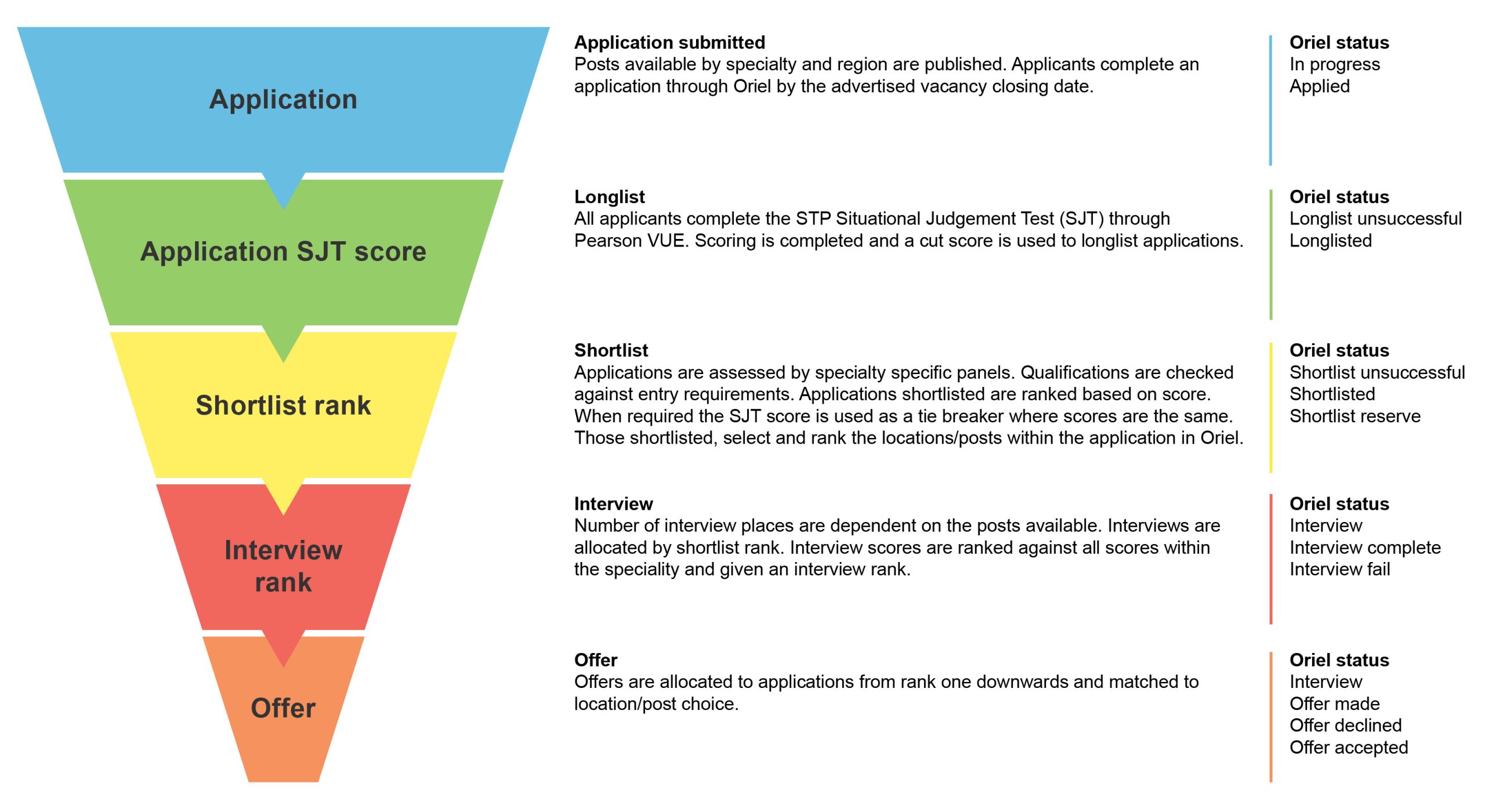
This graphic shows the different stages of the Scientist Training Programme recruitment process. It details what occurs at each stage of the process and the corresponding ‘status’ that will be displayed in Oriel.
Text from the 'Different stages of recruitment' graphic
Application
Application submitted – Posts available by specialty and region are published. Applicants complete an application through Oriel by the advertised vacancy closing date.
Oriel status – In progress / Applied
Application SJT score
Longlist – All applicants complete the STP Situational Judgement Test (SJT) through Pearson VUE. Scoring is completed and a cut score is used to longlist applications.
Oriel status – Longlist unsuccessful / Longlisted
Shortlist rank
Shortlist – Applications are assessed by specialty specific panels. Qualifications are checked against entry requirements. Applications shortlisted are ranked based on score. When required the SJT score is used as a tie breaker where scores are the same. Those shortlisted, select and rank the locations/posts within the application in Oriel.
Oriel status – Shortlist unsuccessful / Shortlisted / Shortlist reserve
Interview rank
Interview – Number of interview places are dependent on the posts available. Interviews are allocated by shortlist rank. Interview scores are ranked against all scores within the speciality and given an interview rank.
Oriel status – Interview / Interview complete / Interview fail
Offer
Offer – Offers are allocated to applications from rank one downwards and matched to location/post choice.
Oriel status – Interview / Offer made / Offer declined / Offer accepted
How to apply to the STP
An application consists of:
- an online application form in which applicants must provide information on how they meet the person specification, details of their qualifications, experience and motivation
- an online situational judgement test (SJT) which evaluates core attributes needed for the programme
Applicants must score above the required threshold on the SJT at the longlisting stage for their application to be put forward for shortlisting. Once this stage has been processed their application status on Oriel will change to ‘longlisted’ or ‘longlist fail’.
Successful longlist applications are reviewed by shortlisters against the requirements of the person specification. The shortlist scores are used to allocate applicants to interview and the interview reserves list. We manage the interview process by working with employing organisations and by notifying applicants of the interview outcome.
Support for applicants is provided by emailing england.hcsapplicants@nhs.net
Registering on Oriel, the online application portal
You can register on Oriel as early as you wish but you will not be able to apply until the application window for vacancies opens.
- Visit the Oriel website at https://www.oriel.nhs.uk/Web/Home
- Click on ‘Register’ to create a user account.
- Use an email address that we can contact you on up until the programme start date, rather than a work or university email address.
- Select the option ‘Register to apply to scientist training programmes’ and continue.
- Complete the details to create your user account. Do not have Oriel open in more than one tab within a single browser, as this will cause accidental data changes to be made when a save occurs in one of these tabs.
The information you provide will be used to auto populate some parts in the application. In the employment history section Oriel requires you to enter an end date for your current employment. If you are currently employed and will need to leave your job to join the programme, enter the 31 August 2026 as your end date.
We use direct messaging in Oriel to contact you about applications in progress. We may also use the email address supplied to us via Oriel, but your main source of information throughout will be Oriel. Once applications open make sure you check your Oriel account on a regular basis to stay informed.
Minimum browser requirements for Oriel
| Browser | Version |
| Apple Safari | v12+ |
| Google Chrome | v77+ |
| Microsoft Edge | all |
| Mozilla Firefox | 68+ |
Searching for a vacancy
When STP opens for applications and you have registered on Oriel, log into your account. To search for a vacancy click the vacancies tab on the homepage and under the training programme option select ‘Scientist Training Programme’ and under post type select ‘Healthcare Science – Direct Entry’. Do not select the ‘Healthcare Science – In-service’ option as this is only for current NHS employees who have been nominated by their employer for an approved post. As a direct entry applicant you cannot apply for the in-service vacancies. Once you find the correct vacancy select ‘Apply’.
Check opening and closing dates and times
There are multiple opening and closing deadlines and times that applicants need to be aware of, for different stages of the recruitment process. You will need to check the website on a regular basis throughout the application process for the most recent updates as things are subject to change.
Application opening and closing dates are published on the vacancy and on our website. Please be aware that all published times are UK GMT and if applying from overseas, times differences must be considered when submitting an application.
The Situational Judgment Test has its own opening and closing dates. If this is the first time you have taken the Situational Judgement Test, you will receive an email with confirmation of your account login details before the test window opens.
If you go on to be shortlisted there will be a window of time when you must choose your sub-preferences (locations/organisations you would like to be considered for). Please be aware of these dates and make sure you choose your sub-preferences by the allotted closing date and time.
Prepare your supporting information
To help you prepare your application the 3 questions below will be asked as part of the supporting information section on Oriel for 2026 applications. These should be answered in relation to the STP Job Description and Person Specification. You do not have to cover every element but should select those which, in your view, best reflect your strengths and suitability.
The supporting information you provide along with the education sections of the application will be reviewed by shortlisters as a whole. For example, a skill you may mention in your motivation for applying will be considered as part of your application, therefore you do not have to repeat this skill across other sections. Review will not include employment history so you may wish to include this. Do not include your name or any other identifiable information in this section.
Whilst Artificial Intelligence (AI) can be useful, it should not be used to generate your supporting information. Applications may be screened for AI. Answers should be your own wording based on your skills, experiences and motivation for applying to the STP.
Each question has a maximum word capacity of 500 words. We strongly recommend you use this allocation fully.
- What is your motivation for applying to the STP including your chosen specialty?
- What is your understanding of the role of a healthcare scientist within your chosen specialty?
- What skills and experience do you have that make you an ideal trainee clinical scientist? You should include how your qualifications meet the STP entry criteria.
The application form
You can save and return to your application form as many times as you like before submitting it. The application form has initial screening questions, and you must meet the minimum eligibility criteria to be able to proceed with the application. You must provide details on the following:
- personal information
- academic history
- work experience
- general employment history
- equality and diversity data
You may have already provided some of this data when completing the registration process and Oriel will auto-populate your application form.
In the ‘supporting information’ section you will need to provide details of your skills and experience in relation to the STP Job Description and Person Specification. The supporting information section and education section of the application will be viewable by shortlisters.
Choosing your specialty or ‘preference’
When completing the application form you must select 1 specialty in which you would like to train. This is in the ‘Preferences’ section of the application form. To select and save your preference you will use a ‘drag and drop’ motion. You will drag your chosen preference from the ‘not wanted’ column and drop it into the ‘wanted’ column. We highly recommend that when completing the application form you use a PC or laptop, as you will be unable to perform the ‘drag and drop’ motion on a touch screen device e.g. phone or tablet. Further guidance can be found within the Oriel resource bank or watch the short animation below.
Fitness to practise questions
The fitness to practise questions in the application form cover things such as criminal convictions. If you answer ‘yes’ to any of these questions, you are required to complete the Fitness to Practise Declaration form and submit with your application.
If you are successful at the interviews, the information you have provided will be considered by a panel. They will decide whether the information you have provided makes you unsuitable for the programme.
False declarations
Any false declarations will invalidate your application and you will be removed from the recruitment process.
You are only permitted to make 1 application per vacancy and therefore apply to 1 specialty only. If you submit more than 1 application for a single vacancy you will be disqualified from the recruitment process and your application will not be considered any further.
Resources to help you with your application
We have published a selection of videos featuring current STP trainees talking about the programme, how to make an application stand out, preparing for the situational judgement test, and choosing a preferred location/sub preference. Also available is a short presentation by one of the STP Training Programme Directors on applying to the STP, where to find main sources of information, and what shortlisters are looking for in an application.
Applying for the Scientist Training Programme (STP)
Dr Jo Horne, STP Training Programme Director
Click this link to watch the recording
Advice for applicants from a current STP trainee in Cardiac Science
Anna Battersby, 2nd year trainee in Cardiac Science
Click this link to watch the recording
Advice for applicants from a current STP trainee in Respiratory and Sleep Science
Emma Hesketh, 2nd year trainee in Respiratory and Sleep Science
Click this link to watch the recording
Advice for applicants from a current STP trainee in Pharmaceutical Science
Ruhel Uddin, 2nd year trainee in Pharmaceutical Science
Click this link to watch the recording
Advice for applicants from a current STP trainee in Clinical Engineering
Ella Brown, 2nd year trainee in Clinical Engineering
Click this link to watch the recording
Advice for applicants from a current STP trainee in Cancer Genomics
Cynthia Ugwu, 2nd year trainee in Cancer Genomics
Click this link to watch the recording
Useful information
- For general queries about the recruitment process read this guidance and the STP FAQs, together with the programme information in the applicants section. If you do not find an answer to your query please email england.hcsapplicants@nhs.net
- Visit our Curriculum Library for details of the STP curricula.
- For background information on the STP, including career and specialty information please visit the Health Careers website.