FAQs for trainees
Please complete and send us the ‘Request New Training Officer/Supervisor’ form which you can find under the ‘Forms’ tab on your ‘My Portfolio’ page in OneFile.
You can nominate a new assessor when you are about to send a submission for sign-off. Click on the blue ‘Change’ button next to your training officer’s name at the bottom of the submission. Next, select ‘Invite new assessor’. Search by your assessor’s email address; if the assessor already exists in OneFile, simply select their name and the submission will be assigned to them when you sign and submit it.
If the assessor is not found, please fill in the small nomination form. Your training officer will then receive a task to approve the nomination. Once approved, the nominated assessor will receive an automated email from OneFile asking them to accept their nomination. When accepted, they will receive an additional email from OneFile with instructions on how to finalise their account. Please ensure you have given your new assessor the links to assessor guidance as OneFile’s automated emails will not contain this guidance.
It is likely that you did not submit the minimum required number of different types of observed assessments. To fully count towards module completion, you must create separate individual submissions for DOPS, OCEs and CBDs, using the correct submission type.
For example, if a module requires 3 case-based discussions and 3 DOPS and/or OCEs, to fully complete the module and have it signed off by your training officer, you must make 6 separate submissions, as follows:
- 3 individual CBD submissions
- any combination of 3 individual DOPS and/or OCEs
You should not select ‘Training Activity’ as your submission type when submitting a CBD, DOPS or OCE, as a ‘Training Activity’ submission will not count towards observed assessment progress.
Similarly, for trainees on the pre-2022 curriculum (and Clinical Microbiology trainees on pre-2023 curriculum), when uploading your Multi-Source Feedback documents into the Multi-Source Feedback module, you should only use the Multi-Source Feedback submission type.
More information on carrying out observed assessments can be found in section 2.2 of the NSHCS work-based assessment standards.
Let us know your chosen specialty pathway using the ‘Specialty Pathway Confirmation’ form, which you can find under the ‘Forms’ tab on your ‘My Portfolio’ page.
OneFile uses a keychain system to link multiple accounts. This is a single email address you use to login to access all of your accounts. In most cases, when we setup your account, if your email address is already in the system, your new account will be added to that keychain. If you have an older account that was never linked to a keychain you will need to manually link your account to your keychain. Please see this article on for guidance on how to link your account to your keychain.
It is most likely that your assessor did not correctly sign off your submission. In most cases this means the tick-box(es) at the top of your submission, where you indicate the training activity or observed assessment relating to this submission, was left unticked by the assessor. Please ask your training officer to unlock your submission, so that it can be re-assessed with the correct boxes ticked. We recommend that you forward these guidance materials to your assessor.
Guidance: How to unlock a submission in OneFile
Video: How to sign off competencies and send competencies for resubmission (7:30)
Video: How to sign off observational assessments (DOPS/OCE/CBD) (9:11)
Video: How to respond to a submission in OneFile (1:46)
Infographic: How to respond to a submission (JPEG)
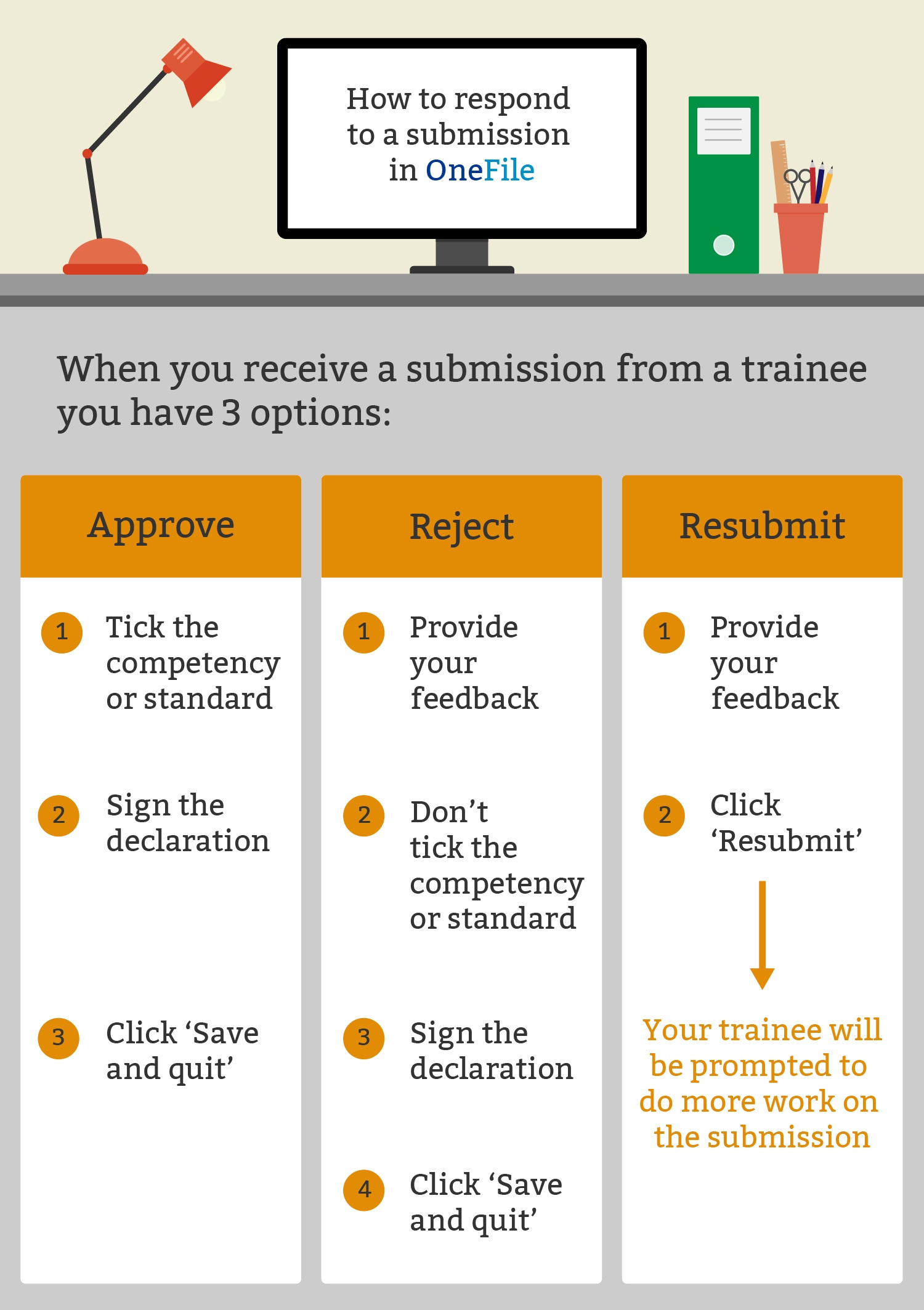
In order to delete your submission your training officer will first need to unlock your submission back to you. You can then delete the draft by clicking the delete button at the bottom of the submission.
Only your trainer(s) can unlock submissions. Please provide to your training officer or assessor either of the below pieces of guidance:
Guidance: How to unlock a submission in OneFile
If a task persists after completing, please click the blue ‘Hide’ button next to the task. It will then move to your ‘Completed’ task list.
Move to MSF section, see below for updated text.
FAQs for trainers
Supervisor and assessor access is trainee-led. Please ask the trainee to send us a ‘Request New Training Officer/Supervisor’ form located in their portfolio. If you are only going to assess 1 or 2 submissions, please ask them to go through the assessor nomination process within their submission.
Watch this short video about unlocking a trainee’s submission or read the guidance notes.
OneFile uses a keychain system to link multiple accounts. This is a single email address you use to login to access all of your accounts. In most cases, when we setup your account, if your email address is already in the system, your new account will be added to that keychain. If you have an older account that was never linked to a keychain you will need to manually link your account to your keychain. Please see this article on for guidance on how to link your account to your keychain.
If a task persists after completing, please click the blue ‘Hide’ button next to the task. It will then move to your ‘Completed’ task list.
It is likely that you have not registered for email alerts in OneFile. The task should be on your task list, but you will only receive an email alert by registering for these alerts in your user profile. First, access ‘My account’ by clicking your name on the top right of the screen, then select ‘Profile’, then select ‘Email Preferences’. You can register for email alerts in the relevant section beneath your email addresses. If you have registered for email alerts and you have not received an email alert, and the task does not appear on your task list, please contact the servicedesk on england.nshcs.digital@nhs.net so we can investigate to whom the submission is assigned.
Our digital services team can merge your accounts together. Please contact the team on england.nshcs.digital@nhs.net with details on which accounts you have, and which you would like to keep using. Our team will merge your accounts together and any pending tasks and linked trainees on the duplicate accounts will be moved to your main account.
You most likely have multiple accounts. This may have happened with multiple trainees nominating you to sign off work before you had a chance to activate either account, or you’ve been nominated to sign off trainee submissions under a different email address not already on OneFile. Please contact the servicedesk on england.nshcs.digital@nhs.net and we can investigate the reason.
The nomination for you to assess will first need to be approved by the trainee’s training officer. Please liaise directly with them to prompt them to check their OneFile tasks for your nomination approval. If they do not have that task, please contact the servicedesk on england.nshcs.digital@nhs.net as we will need to investigate.
Multi-Source Feedback FAQs
As an STP trainee, you can only register on Agilio in the second year of the programme. If you are a second year STP trainee or a first year HSST trainee and cannot find your registration code, please contact the servicedesk on england.nshcs.digital@nhs.net.
For STP trainees, click this link for guidance on registering with Agilio (the online MSF tool) and help on how to start, submit and review your MSF.
For HSST trainees, click this link for guidance on registering with Agilio (the online MSF tool) and help on how to start, submit and review your MSF.
No. Agilio is programmed to automatically close your MSF after 21 days. This is coded into the software; MSFs cannot be closed early or extended. This also gives your raters an opportunity to update/revise their responses.
No. Each MSF report is generated once 21 days has elapsed. If you did not receive enough ratings, please start another MSF and nominate all of the raters from your initial MSF. Please explain to your raters that you did not receive enough responses and you would appreciate them carrying out their rating again.
Yes, the digital support team can send reminders through the Agilio software. Please contact the servicedesk on england.nshcs.digital@nhs.net and ask them to please send reminders for your MSF. You should also liaise with your employer’s IT department to ensure that emails from ‘@clarity.co.uk’ and ‘@agiliosoftware.com’ are not being swept up by third-party email filters.
MSFs and training plans are not explicit requirements to complete the HSST programme. The School has included these in your OneFile portfolios for your convenience. Anything added or signed off in these modules will not count towards completion. Your portfolio progress and completion is determined by your ‘evidence of activity’ submissions within your Standards of Proficiency.